
INSIGHTS & INSPIRATION
PRODUCT LEARNING & SUPPORT
INSIGHTS & INSPIRATION
PRODUCT LEARNING & SUPPORT
ProtoPie Player
ProtoPie 企业版
菜单
ProtoPie Player
ProtoPie 企业版
将 Arduino 与 ProtoPie Connect 搭配使用
借助 ProtoPie Connect 内置的 Arduino 插件,在软件与硬件之间创建多屏体验。
ProtoPie Connect 支持与 Arduino 开发板进行 串行通信 。最常见的设置是通过 USB 将 Arduino 硬件连接到运行 ProtoPie Connect 的设备。
了解更多 关于如何使用 Arduino。
通过 USB 将 Arduino 连接到 ProtoPie Connect
在 ProtoPie Connect 的插件列表中选择 Arduino。
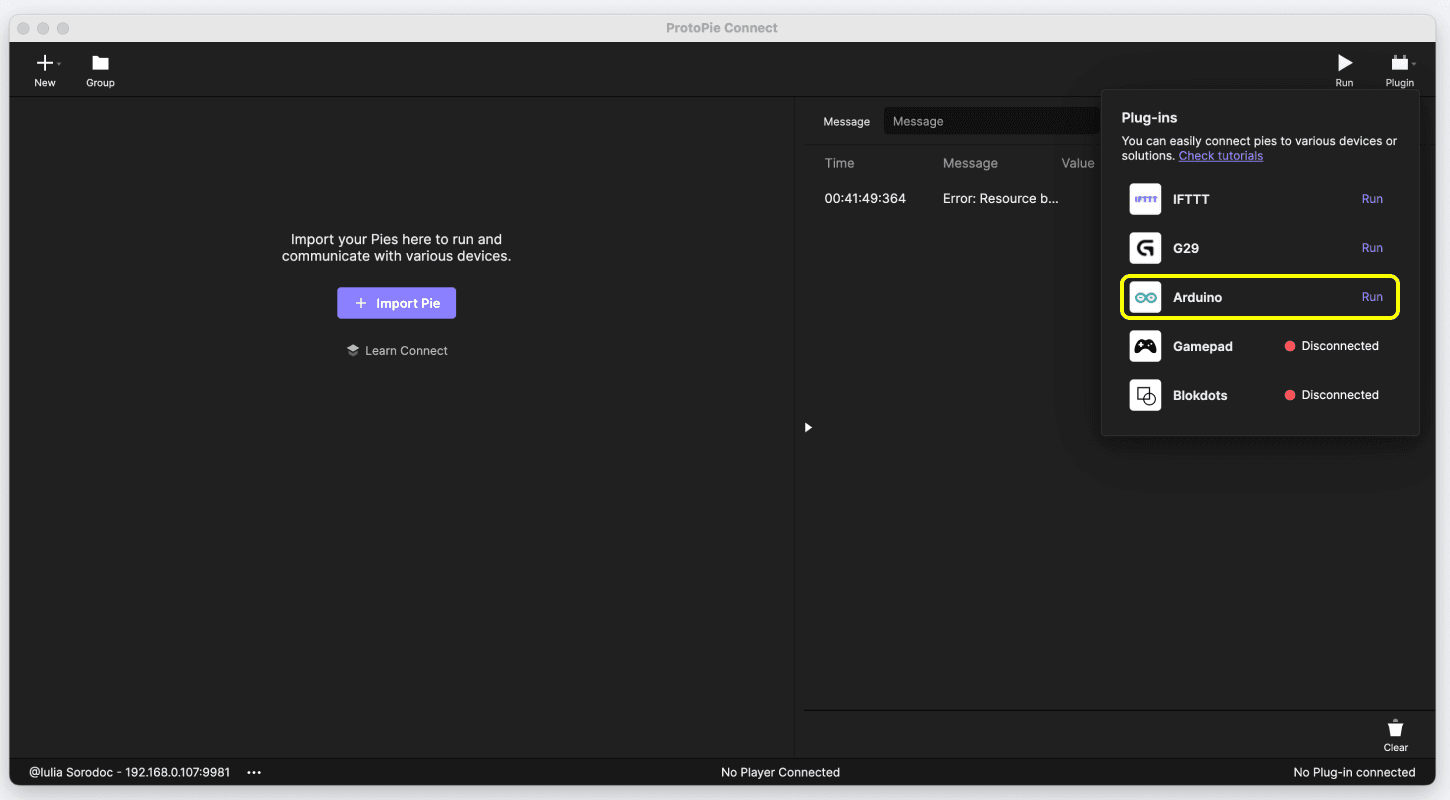
选择所需的 端口 和 波特率:
端口:选择与你的 Arduino 开发板对应的端口。
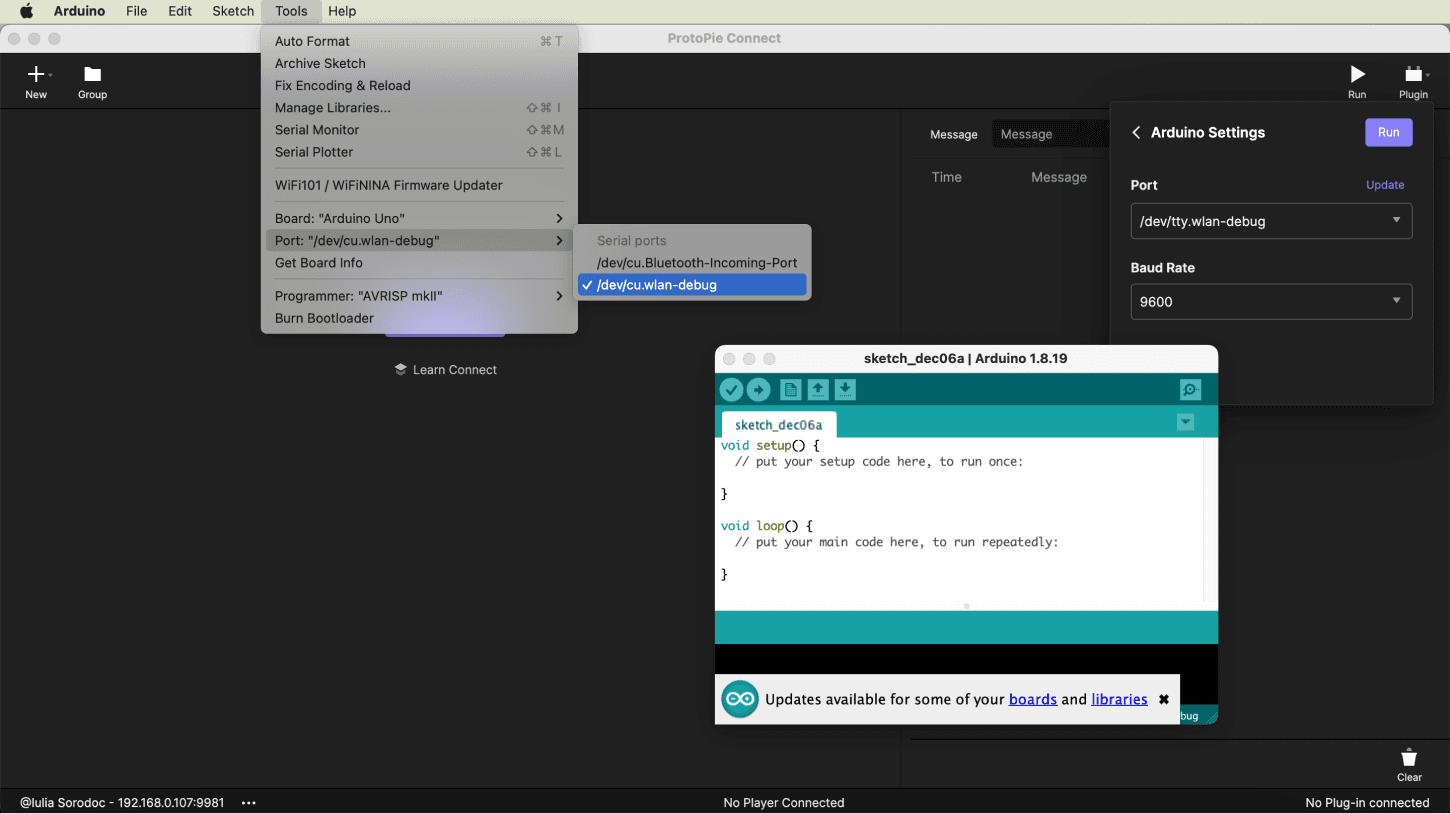
波特率:该值决定了串行连接检查更新的频率。你可以选择默认值 9600。
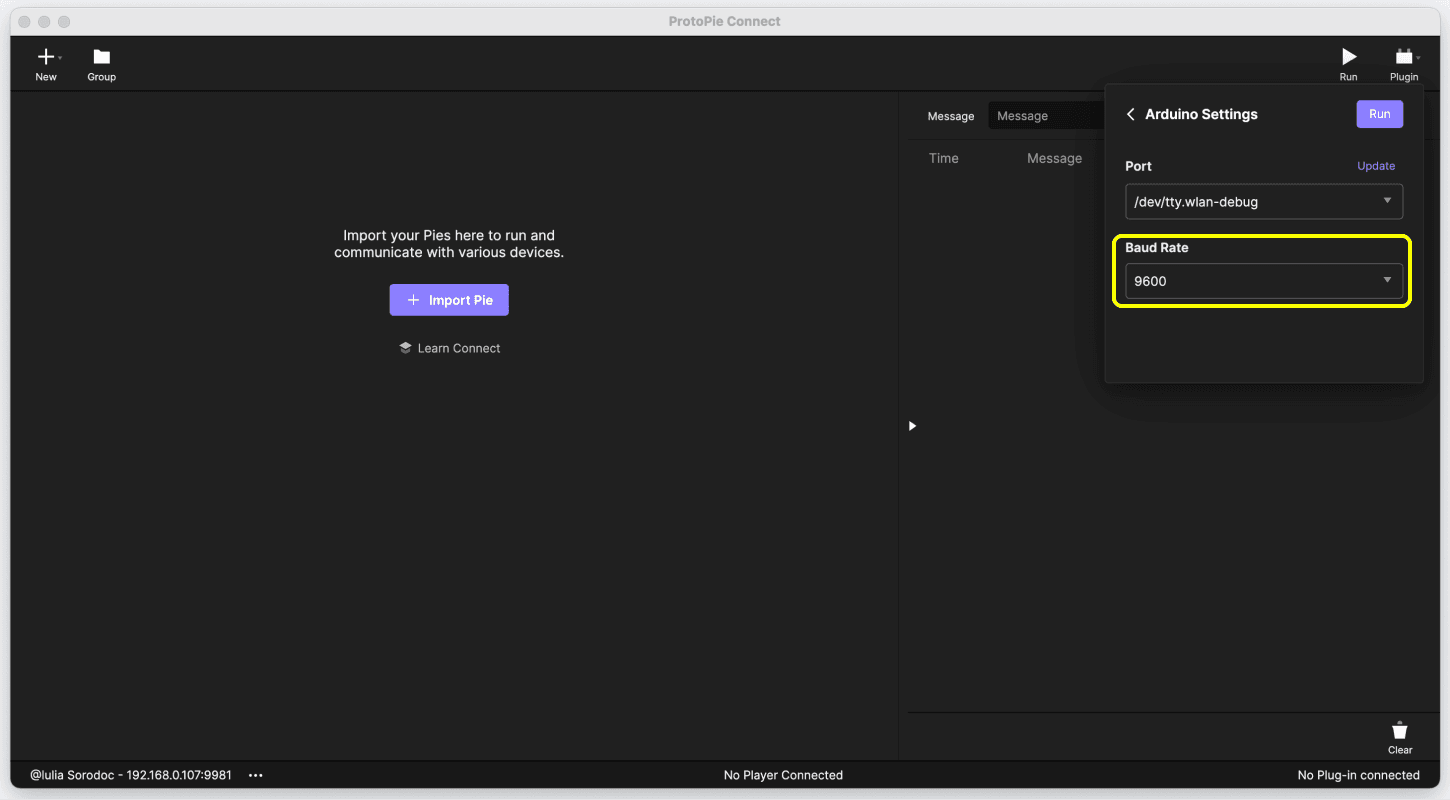
*请注意,Arduino 插件适用于任何通过串行通信的微控制器。例如,如果你想使用 ESP32 微控制器,在连接 ESP32 后,你可以选择合适的端口和波特率来打开 ESP32 的串口,并在 ProtoPie Connect 中接收数据。
在 ProtoPie Connect 中使用 Arduino
ProtoPie Connect 与 Arduino 使用 Message||Value 格式进行通信。如果只是想发送不带值的消息,仅使用 Message 即可。
从 Arduino 发送消息
使用 Serial.println() 函数将消息(和值)发送到 ProtoPie Connect,随后 ProtoPie Connect 会将其传递给所有对应的原型。
在以下示例中,Arduino 每 2 秒向 ProtoPie Connect 发送消息 ROTATE 和数值 90。
void setup() {
  Serial.begin(9600);
}

void loop() {
  // Send "ROTATE" to ProtoPie
  // message: ROTATE
  // value: 90
  Serial.println("ROTATE||90");
  delay(2000);
}
void setup() {
  Serial.begin(9600);
}

void loop() {
  // Send "ROTATE" to ProtoPie
  // message: ROTATE
  // value: 90
  Serial.println("ROTATE||90");
  delay(2000);
}
void setup() {
  Serial.begin(9600);
}

void loop() {
  // Send "ROTATE" to ProtoPie
  // message: ROTATE
  // value: 90
  Serial.println("ROTATE||90");
  delay(2000);
}
void setup() {
  Serial.begin(9600);
}

void loop() {
  // Send "ROTATE" to ProtoPie
  // message: ROTATE
  // value: 90
  Serial.println("ROTATE||90");
  delay(2000);
}
void setup() {
  Serial.begin(9600);
}

void loop() {
  // Send "ROTATE" to ProtoPie
  // message: ROTATE
  // value: 90
  Serial.println("ROTATE||90");
  delay(2000);
}
向 Arduino 发送消息
Arduino 硬件需要单独的代码来解析传入的 Message||Value 格式消息。
在下面的示例中,Arduino 接收并解析来自 ProtoPie Connect 的消息。
#include <string.h>

// Declare struct
struct MessageValue {
  String message;
  String value; // Note that value is of String type
};

// Declare function that parse message format
struct MessageValue getMessage(String inputtedStr) {
  struct MessageValue result;

  char charArr[50];
  inputtedStr.toCharArray(charArr, 50);
  char* ptr = strtok(charArr, "||");
  result.message = String(ptr);
  ptr = strtok(NULL, "||");

  if (ptr == NULL) {
    result.value = String("");
    return result;
  }

  result.value = String(ptr);

  return result;
}

// Declare MessageValue struct's instance
struct MessageValue receivedData;

void setup() {
  Serial.begin(9600);

/*
		if you want to make waiting time for reading serial data short,
		set waiting time with `Serial.setTimeout` function.
	*/
	Serial.setTimeout(10);
}

void loop() {
// Take out strings until Serial buffer is empty
	while (Serial.available() > 0) {
// From ProtoPie Connect 1.9.0, We can use '\0' as delimiter in Arduino Serial
		String receivedString = Serial.readStringUntil('\0');

		receivedData = getMessage(receivedString);
  }

	// Do something with received message from ProtoPie Connect

	if (receivedData.message.equals("FIRST")) { // If message from ProtoPie Connect equals "FIRST" do the following
		l1 = receivedData.value.toInt(); // receivedData.value.toInt() converts the value from ProtoPie Connect to integer type and assigns it to l1
		analogWrite(firstLED, l1);
	}
}
#include <string.h>

// Declare struct
struct MessageValue {
  String message;
  String value; // Note that value is of String type
};

// Declare function that parse message format
struct MessageValue getMessage(String inputtedStr) {
  struct MessageValue result;

  char charArr[50];
  inputtedStr.toCharArray(charArr, 50);
  char* ptr = strtok(charArr, "||");
  result.message = String(ptr);
  ptr = strtok(NULL, "||");

  if (ptr == NULL) {
    result.value = String("");
    return result;
  }

  result.value = String(ptr);

  return result;
}

// Declare MessageValue struct's instance
struct MessageValue receivedData;

void setup() {
  Serial.begin(9600);

/*
		if you want to make waiting time for reading serial data short,
		set waiting time with `Serial.setTimeout` function.
	*/
	Serial.setTimeout(10);
}

void loop() {
// Take out strings until Serial buffer is empty
	while (Serial.available() > 0) {
// From ProtoPie Connect 1.9.0, We can use '\0' as delimiter in Arduino Serial
		String receivedString = Serial.readStringUntil('\0');

		receivedData = getMessage(receivedString);
  }

	// Do something with received message from ProtoPie Connect

	if (receivedData.message.equals("FIRST")) { // If message from ProtoPie Connect equals "FIRST" do the following
		l1 = receivedData.value.toInt(); // receivedData.value.toInt() converts the value from ProtoPie Connect to integer type and assigns it to l1
		analogWrite(firstLED, l1);
	}
}
#include <string.h>

// Declare struct
struct MessageValue {
  String message;
  String value; // Note that value is of String type
};

// Declare function that parse message format
struct MessageValue getMessage(String inputtedStr) {
  struct MessageValue result;

  char charArr[50];
  inputtedStr.toCharArray(charArr, 50);
  char* ptr = strtok(charArr, "||");
  result.message = String(ptr);
  ptr = strtok(NULL, "||");

  if (ptr == NULL) {
    result.value = String("");
    return result;
  }

  result.value = String(ptr);

  return result;
}

// Declare MessageValue struct's instance
struct MessageValue receivedData;

void setup() {
  Serial.begin(9600);

/*
		if you want to make waiting time for reading serial data short,
		set waiting time with `Serial.setTimeout` function.
	*/
	Serial.setTimeout(10);
}

void loop() {
// Take out strings until Serial buffer is empty
	while (Serial.available() > 0) {
// From ProtoPie Connect 1.9.0, We can use '\0' as delimiter in Arduino Serial
		String receivedString = Serial.readStringUntil('\0');

		receivedData = getMessage(receivedString);
  }

	// Do something with received message from ProtoPie Connect

	if (receivedData.message.equals("FIRST")) { // If message from ProtoPie Connect equals "FIRST" do the following
		l1 = receivedData.value.toInt(); // receivedData.value.toInt() converts the value from ProtoPie Connect to integer type and assigns it to l1
		analogWrite(firstLED, l1);
	}
}
#include <string.h>

// Declare struct
struct MessageValue {
  String message;
  String value; // Note that value is of String type
};

// Declare function that parse message format
struct MessageValue getMessage(String inputtedStr) {
  struct MessageValue result;

  char charArr[50];
  inputtedStr.toCharArray(charArr, 50);
  char* ptr = strtok(charArr, "||");
  result.message = String(ptr);
  ptr = strtok(NULL, "||");

  if (ptr == NULL) {
    result.value = String("");
    return result;
  }

  result.value = String(ptr);

  return result;
}

// Declare MessageValue struct's instance
struct MessageValue receivedData;

void setup() {
  Serial.begin(9600);

/*
		if you want to make waiting time for reading serial data short,
		set waiting time with `Serial.setTimeout` function.
	*/
	Serial.setTimeout(10);
}

void loop() {
// Take out strings until Serial buffer is empty
	while (Serial.available() > 0) {
// From ProtoPie Connect 1.9.0, We can use '\0' as delimiter in Arduino Serial
		String receivedString = Serial.readStringUntil('\0');

		receivedData = getMessage(receivedString);
  }

	// Do something with received message from ProtoPie Connect

	if (receivedData.message.equals("FIRST")) { // If message from ProtoPie Connect equals "FIRST" do the following
		l1 = receivedData.value.toInt(); // receivedData.value.toInt() converts the value from ProtoPie Connect to integer type and assigns it to l1
		analogWrite(firstLED, l1);
	}
}
#include <string.h>

// Declare struct
struct MessageValue {
  String message;
  String value; // Note that value is of String type
};

// Declare function that parse message format
struct MessageValue getMessage(String inputtedStr) {
  struct MessageValue result;

  char charArr[50];
  inputtedStr.toCharArray(charArr, 50);
  char* ptr = strtok(charArr, "||");
  result.message = String(ptr);
  ptr = strtok(NULL, "||");

  if (ptr == NULL) {
    result.value = String("");
    return result;
  }

  result.value = String(ptr);

  return result;
}

// Declare MessageValue struct's instance
struct MessageValue receivedData;

void setup() {
  Serial.begin(9600);

/*
		if you want to make waiting time for reading serial data short,
		set waiting time with `Serial.setTimeout` function.
	*/
	Serial.setTimeout(10);
}

void loop() {
// Take out strings until Serial buffer is empty
	while (Serial.available() > 0) {
// From ProtoPie Connect 1.9.0, We can use '\0' as delimiter in Arduino Serial
		String receivedString = Serial.readStringUntil('\0');

		receivedData = getMessage(receivedString);
  }

	// Do something with received message from ProtoPie Connect

	if (receivedData.message.equals("FIRST")) { // If message from ProtoPie Connect equals "FIRST" do the following
		l1 = receivedData.value.toInt(); // receivedData.value.toInt() converts the value from ProtoPie Connect to integer type and assigns it to l1
		analogWrite(firstLED, l1);
	}
}
使用场景
尝试复现以下用例,以更好地理解 Arduino 如何与 ProtoPie Connect 协同工作。
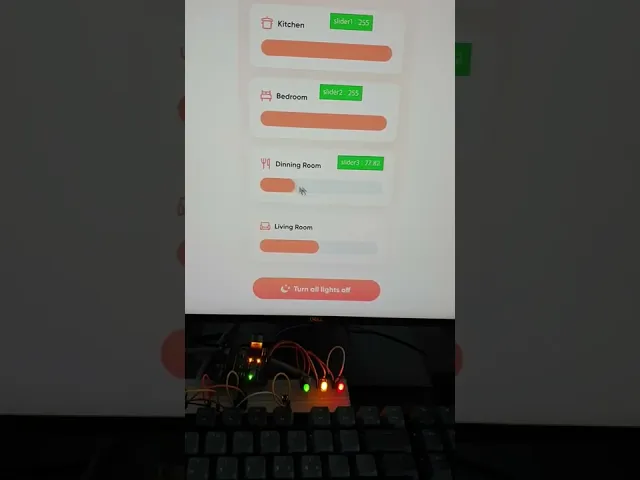
控制家中的灯光
连续打开和关闭灯光。使用连接到 ProtoPie Connect 的 Arduino 开发板亲自测试一下。
将 此原型 添加到 ProtoPie Connect。
按照此电路图设置你的 Arduino 开发板和灯光控制。
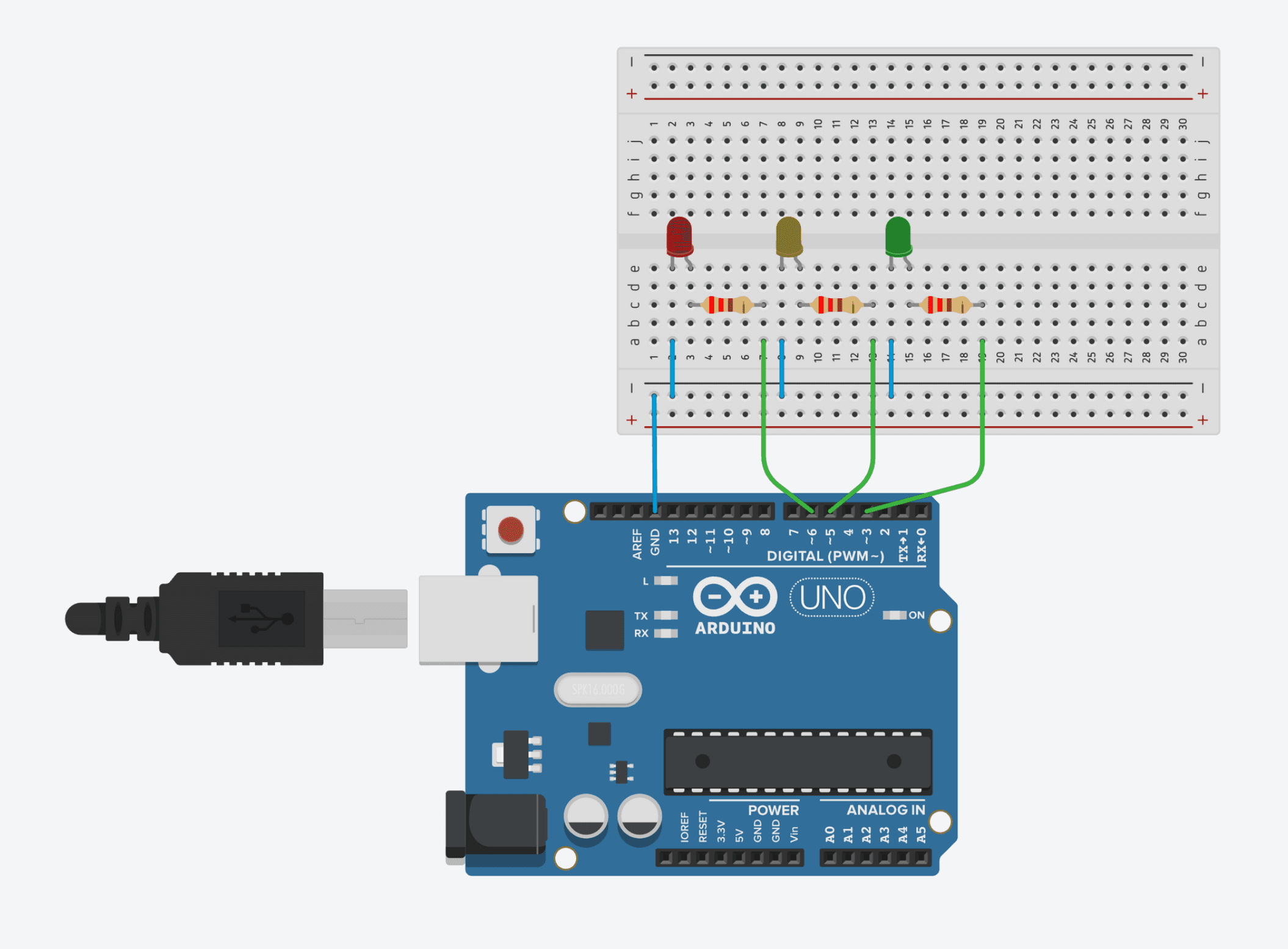
将你的 Arduino 开发板连接到 ProtoPie Connect。
使用此示例代码将消息从 Arduino 发送到 ProtoPie Connect。
#include <string.h>

struct MessageValue {
  String message;
  String value;
};

struct MessageValue getMessage(String inputtedStr) {
  struct MessageValue result;

  char charArr[50];
  inputtedStr.toCharArray(charArr, 50);
  char* ptr = strtok(charArr, "||");
  result.message = String(ptr);
  ptr = strtok(NULL, "||");

  if (ptr == NULL) {
    result.value = String("");
    return result;
  }

  result.value = String(ptr);

  return result;
}

int firstLED = 3;
int secondLED = 5;
int thirdLED = 6;
struct MessageValue receivedData;

void setup() {
  pinMode(firstLED, OUTPUT);
  pinMode(secondLED, OUTPUT);
  pinMode(thirdLED, OUTPUT);
  Serial.begin(9600);
  Serial.setTimeout(10); // Set waiting time for serial data to 10 milliSeconds
}

void loop() {
  while (Serial.available() > 0) { // Take out strings until Serial is empty
    String receivedString = Serial.readStringUntil('\0'); // From 1.9.0 version, We can use '\0' as delimiter in Arduino Serial
    receivedData = getMessage(receivedString);
  }

  if (receivedData.message.equals("FIRST")) {
    analogWrite(firstLED, receivedData.value.toInt());
    delay(30);
  } else if (receivedData.message.equals("SECOND")) {
    analogWrite(secondLED, receivedData.value.toInt());
    delay(30);
  } else {
    analogWrite(thirdLED, receivedData.value.toInt());
    delay(30);
  }
}
#include <string.h>

struct MessageValue {
  String message;
  String value;
};

struct MessageValue getMessage(String inputtedStr) {
  struct MessageValue result;

  char charArr[50];
  inputtedStr.toCharArray(charArr, 50);
  char* ptr = strtok(charArr, "||");
  result.message = String(ptr);
  ptr = strtok(NULL, "||");

  if (ptr == NULL) {
    result.value = String("");
    return result;
  }

  result.value = String(ptr);

  return result;
}

int firstLED = 3;
int secondLED = 5;
int thirdLED = 6;
struct MessageValue receivedData;

void setup() {
  pinMode(firstLED, OUTPUT);
  pinMode(secondLED, OUTPUT);
  pinMode(thirdLED, OUTPUT);
  Serial.begin(9600);
  Serial.setTimeout(10); // Set waiting time for serial data to 10 milliSeconds
}

void loop() {
  while (Serial.available() > 0) { // Take out strings until Serial is empty
    String receivedString = Serial.readStringUntil('\0'); // From 1.9.0 version, We can use '\0' as delimiter in Arduino Serial
    receivedData = getMessage(receivedString);
  }

  if (receivedData.message.equals("FIRST")) {
    analogWrite(firstLED, receivedData.value.toInt());
    delay(30);
  } else if (receivedData.message.equals("SECOND")) {
    analogWrite(secondLED, receivedData.value.toInt());
    delay(30);
  } else {
    analogWrite(thirdLED, receivedData.value.toInt());
    delay(30);
  }
}
#include <string.h>

struct MessageValue {
  String message;
  String value;
};

struct MessageValue getMessage(String inputtedStr) {
  struct MessageValue result;

  char charArr[50];
  inputtedStr.toCharArray(charArr, 50);
  char* ptr = strtok(charArr, "||");
  result.message = String(ptr);
  ptr = strtok(NULL, "||");

  if (ptr == NULL) {
    result.value = String("");
    return result;
  }

  result.value = String(ptr);

  return result;
}

int firstLED = 3;
int secondLED = 5;
int thirdLED = 6;
struct MessageValue receivedData;

void setup() {
  pinMode(firstLED, OUTPUT);
  pinMode(secondLED, OUTPUT);
  pinMode(thirdLED, OUTPUT);
  Serial.begin(9600);
  Serial.setTimeout(10); // Set waiting time for serial data to 10 milliSeconds
}

void loop() {
  while (Serial.available() > 0) { // Take out strings until Serial is empty
    String receivedString = Serial.readStringUntil('\0'); // From 1.9.0 version, We can use '\0' as delimiter in Arduino Serial
    receivedData = getMessage(receivedString);
  }

  if (receivedData.message.equals("FIRST")) {
    analogWrite(firstLED, receivedData.value.toInt());
    delay(30);
  } else if (receivedData.message.equals("SECOND")) {
    analogWrite(secondLED, receivedData.value.toInt());
    delay(30);
  } else {
    analogWrite(thirdLED, receivedData.value.toInt());
    delay(30);
  }
}
#include <string.h>

struct MessageValue {
  String message;
  String value;
};

struct MessageValue getMessage(String inputtedStr) {
  struct MessageValue result;

  char charArr[50];
  inputtedStr.toCharArray(charArr, 50);
  char* ptr = strtok(charArr, "||");
  result.message = String(ptr);
  ptr = strtok(NULL, "||");

  if (ptr == NULL) {
    result.value = String("");
    return result;
  }

  result.value = String(ptr);

  return result;
}

int firstLED = 3;
int secondLED = 5;
int thirdLED = 6;
struct MessageValue receivedData;

void setup() {
  pinMode(firstLED, OUTPUT);
  pinMode(secondLED, OUTPUT);
  pinMode(thirdLED, OUTPUT);
  Serial.begin(9600);
  Serial.setTimeout(10); // Set waiting time for serial data to 10 milliSeconds
}

void loop() {
  while (Serial.available() > 0) { // Take out strings until Serial is empty
    String receivedString = Serial.readStringUntil('\0'); // From 1.9.0 version, We can use '\0' as delimiter in Arduino Serial
    receivedData = getMessage(receivedString);
  }

  if (receivedData.message.equals("FIRST")) {
    analogWrite(firstLED, receivedData.value.toInt());
    delay(30);
  } else if (receivedData.message.equals("SECOND")) {
    analogWrite(secondLED, receivedData.value.toInt());
    delay(30);
  } else {
    analogWrite(thirdLED, receivedData.value.toInt());
    delay(30);
  }
}
#include <string.h>

struct MessageValue {
  String message;
  String value;
};

struct MessageValue getMessage(String inputtedStr) {
  struct MessageValue result;

  char charArr[50];
  inputtedStr.toCharArray(charArr, 50);
  char* ptr = strtok(charArr, "||");
  result.message = String(ptr);
  ptr = strtok(NULL, "||");

  if (ptr == NULL) {
    result.value = String("");
    return result;
  }

  result.value = String(ptr);

  return result;
}

int firstLED = 3;
int secondLED = 5;
int thirdLED = 6;
struct MessageValue receivedData;

void setup() {
  pinMode(firstLED, OUTPUT);
  pinMode(secondLED, OUTPUT);
  pinMode(thirdLED, OUTPUT);
  Serial.begin(9600);
  Serial.setTimeout(10); // Set waiting time for serial data to 10 milliSeconds
}

void loop() {
  while (Serial.available() > 0) { // Take out strings until Serial is empty
    String receivedString = Serial.readStringUntil('\0'); // From 1.9.0 version, We can use '\0' as delimiter in Arduino Serial
    receivedData = getMessage(receivedString);
  }

  if (receivedData.message.equals("FIRST")) {
    analogWrite(firstLED, receivedData.value.toInt());
    delay(30);
  } else if (receivedData.message.equals("SECOND")) {
    analogWrite(secondLED, receivedData.value.toInt());
    delay(30);
  } else {
    analogWrite(thirdLED, receivedData.value.toInt());
    delay(30);
  }
}
外科手术机器人手臂
了解如何为由无线控制器操控的机器人手臂(Arduino Braccio 机器人手臂)制作原型。
查看这篇文章,探索 ProtoPie 在机器人原型设计中的实际应用。